We're big fans of Kit (aff link) here at Teachery and that's why they're one of the few email providers we have direct integrations with.

To connect your account, follow these steps:
Click Account in the top navigation of Teachery
Click the Integrations link option
Scroll down to find the Kit section
Enter your Kit API Key and click Save (find your API in Kit here)
You're integrated! ✅
Below is a video to walk you through our Kit integration and how you can use it within your payment and landing pages.
We recommend watching the video above but also pictured below is a more up-to-date look of how you’ll access your Kit settings in our original payment or landing page templates (that is, via the Actions button in the top right of the respective page).
If you’re using our new Payment Page Builder, your Kit settings will be in the Integrations option available in the After Payment tab of your payment page.

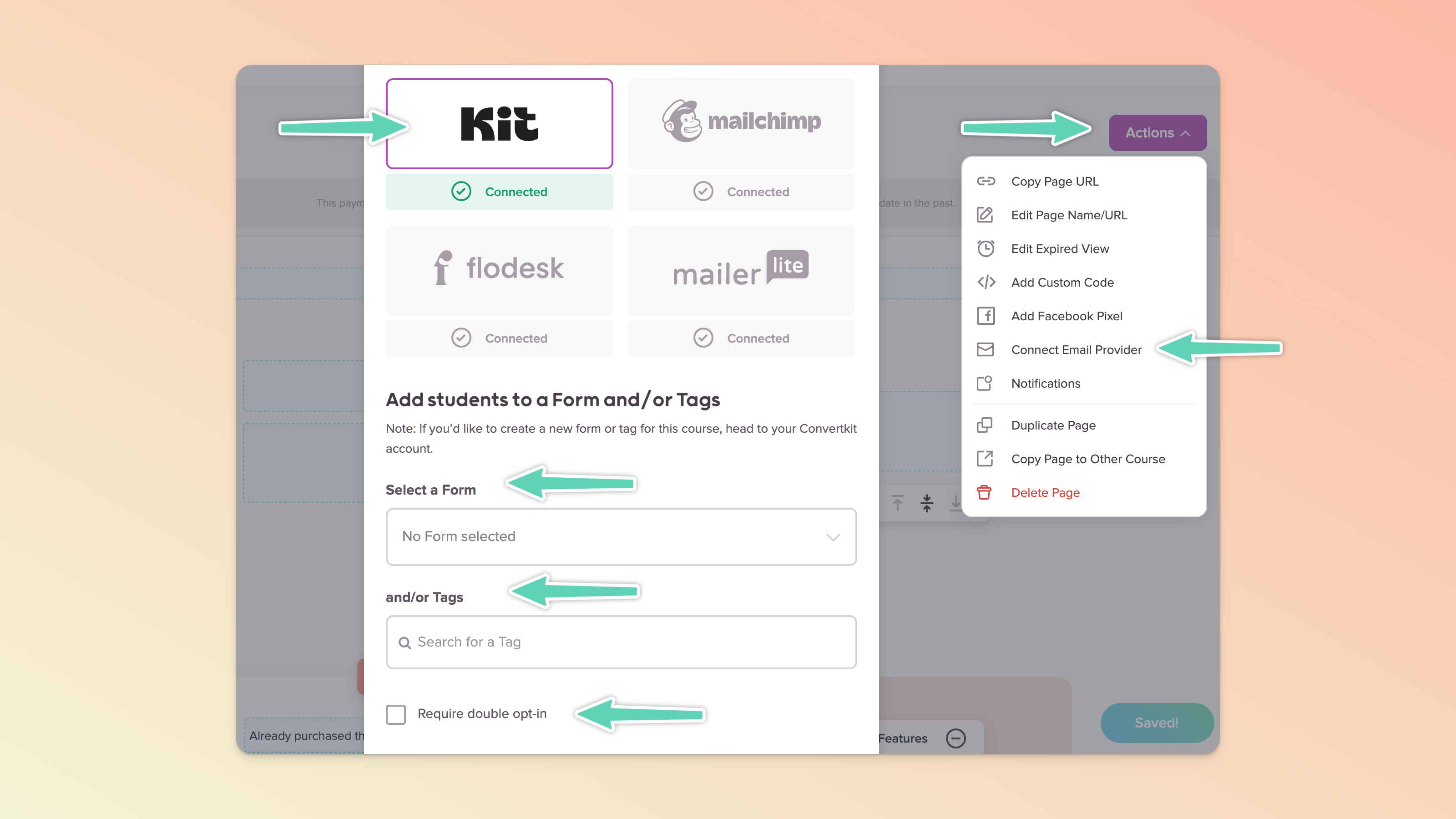
If you want to ensure your customers are double opting-in to receive emails from your Kit account, check the double opt-in box option (pictured above) when setting Kit up in a Teachery payment or landing page.
You’ll need to create a Kit Form (more about that in the next section too). In your Kit Form make sure double opt-in is fully set up. When a customer buys your course, they will then get a Kit confirmation email and need to click the link to confirm before being added to your Kit account.
If you’re not making use of a Kit Form, and only Tags, then double opt-in is not applicable/available.
We recommend that you create new Kit Forms for each Teachery payment or landing page. This way, you can track exactly what's happening between Kit and Teachery, plus you can set up some fun automations in Kit with your course.
Every payment or landing page lets you choose which Kit Form you want to send data through to (they can all go to separate Kit Forms!)
If you want to send a new customer an email sequence after purchasing your course, you can easily create the sequence of emails in Kit and connect it to Teachery.
Create a new Sequence in Kit
Write your sequence emails and set the dates you want them to send (after the purchase happens in Teachery)
Publish your sequence so it's live and ready to send
Create a new Automation (Add Rule) in Kit
Create a trigger for when someone Subscribes to a Form they automatically Subscribe to a Sequence
You're all done in Kit! ✔
Edit the Payment Page customers will buy from
Click the Connect Email Provider button in the Actions menu
Select the specific Kit Form and click Save
You're all done in Teachery and your email sequence is ready for customers ✅
You can test this automation by test-purchasing your own course/product through your Teachery payment page that has the correct Kit Form added to it (the one you just picked in the automation steps above). If you get the first email in the Kit Sequence, you're good to go!
Learn a ton more about Kit's automations here.
💬 If, at this point, you hit any hurdles/doubts and can’t find the answers elsewhere in our help center, please use the support chat bubble* in the bottom right of your screen. Make sure to include course/product info, customer info, helpful screenshots, or anything else that may be relevant to your query.
* Support hours are 09:00 to 17:00 GMT.
