Having people help sell your course(s) is easy using our Course Affiliates feature. You get this feature at no extra cost and you can set up as many affiliates as you like.

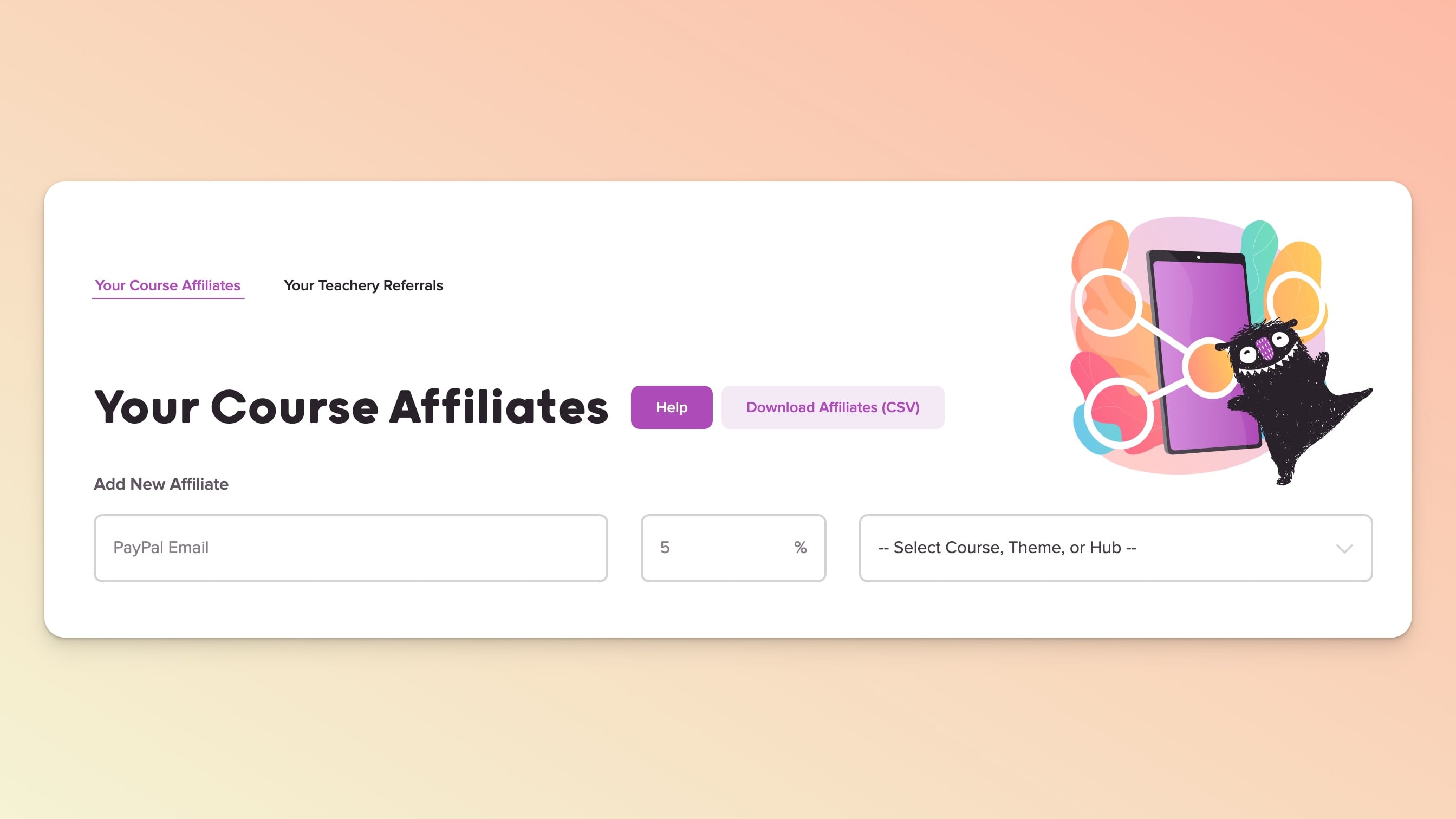
Go to Affiliates in the top navigation
Enter your affiliate's PayPal email address, commission %, and choose the relevant course, or theme, product, or hub
Effective July 2026, you will now also be prompted to select the country in which the Affiliate’s PayPal account is registered (more info below).
Select which payment and/or landing page(s) the affiliate can share and click the Create Affiliate button

If you chose to add an Affiliate to a Hub, any Course you’ve added to the Hub will also earn affiliate commissions (you do not have to add an Affiliate to all individual Courses, only to the Hub).
If you have a primary Payment Page that you use to display multiple payment options, you only need to assign the Affiliate to that primary Payment Page. Regardless of which payment option the customer buys, the referral will still be tracked.
Using our page builder to build a Landing Page? Learn more about how affiliate tracking works with the page builder.
When you've successfully added an affiliate, you AND the affiliate's PayPal email address will receive the Affiliate email with the important affiliate URLs.

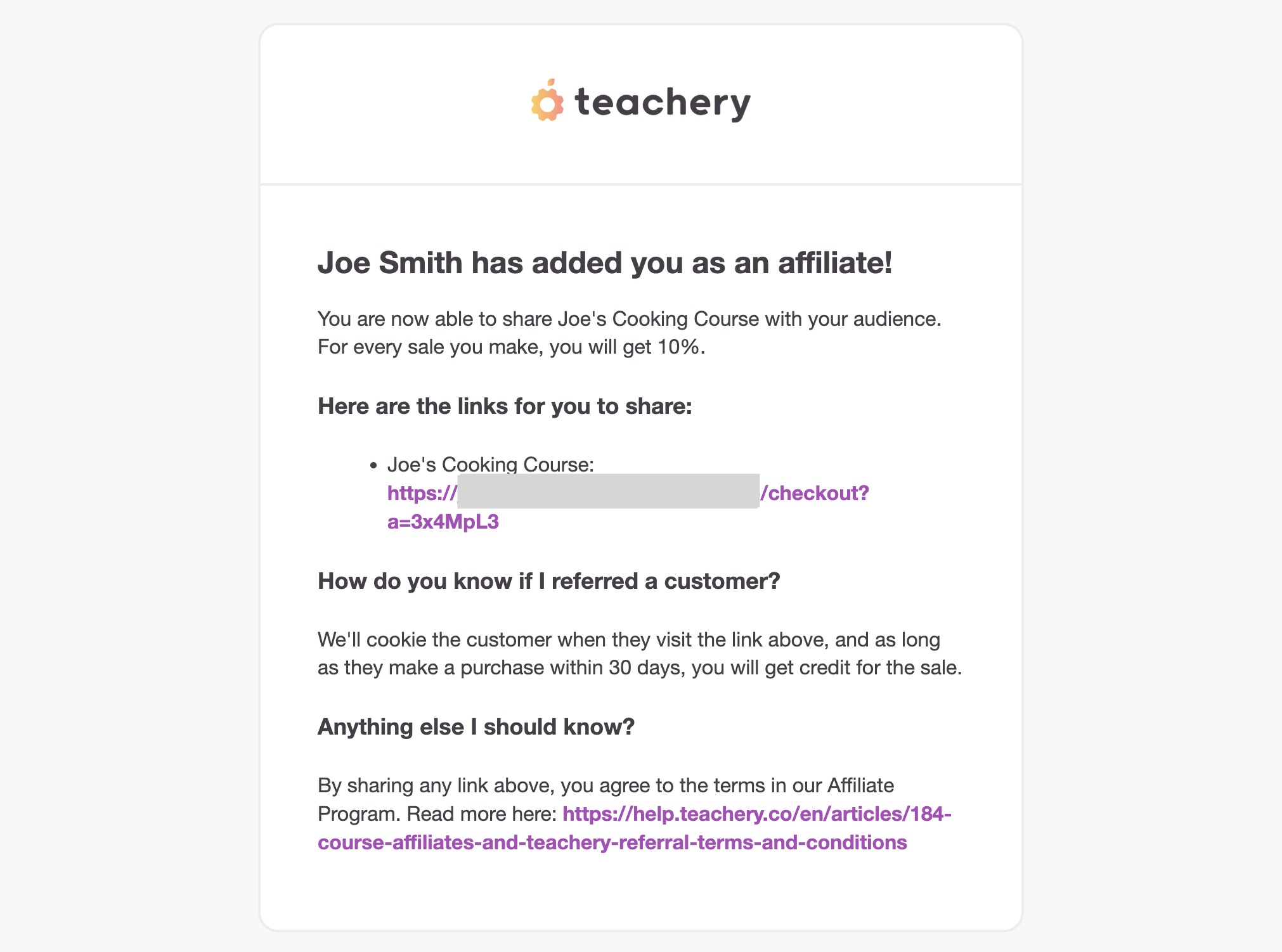
If a course affiliate does not use their affiliate URL, there is no way to track successful course sales to them. Please make sure you and they keep their affiliate URL email in a safe place (more on the emails we send to both of you below).
If you want your affiliate to get different commissions for different Landing or Payment Pages, simply create that same affiliate multiple times. You'll use the same PayPal email address each time, but you can adjust the commission percentage and which pages for each entry. Remember: Whenever you add an affiliate, you and they will receive an email with their unique affiliate links.
You have a fixed payment page that's $100 and a recurring payment page that's $10/month.
If you want your affiliate to get 50% commission on the fixed payment page and 30% commission on the recurring payment page, it's easy to do.
Simply add the affiliate twice, once with a 50% commission and the fixed payment page checked.
Then a second time with a 30% commission and the recurring payment page checked.
Voila! 👍
John is an affiliate of your Vegan Baked Goods course
You create a Landing Page, let's say with Instapage, that's just for John to promote your course. It has your and John's photos on it and you both talk about how awesome vegan baked goods are. There are buy buttons on this page.
Then, in Teachery, you'd add John's PayPal email address as an affiliate to your Vegan Bakes Goods course and whichever Payment Page (in your Teachery course) makes sense for John to promote (maybe you have a $50 payment page and a $150 payment page that gets some cool bonus).
Once you've added John as an affiliate in Teachery, you (and John) get an email with John's affiliate links to your Payment Pages. Grab John's unique Payment Page affiliate links from that email and add them to the buy buttons on John's unique Landing Page you created (with Instapage). Then, John can promote that Landing Page and get all the awesome affiliate commissions when people buy the Vegan Baked Goods course you created. 🍪 🎉
Affiliates who refer new customers to recurring/subscription payment options will earn a commission on all recurring revenue. In the case of a monthly recurring payment page, for example, the Affiliate’s fee will be applied every month for as long as the customer they referred is subscribed. In other words, it is not currently possible to limit Affiliates to a commission on only the first instalment.
If you choose to change an Affiliate’s commission rate, please note:
An email with the updated commission rate will be sent to the Affiliate.
The Affiliate can continue to use/share the same referral links.
Any subscriptions (recurring payment plans) that they were earning commission on, will now reward the Affiliate the new rate on any remaining instalments.
Any new sales made after the change will adopt the new rate from the onset.
If you choose to deactivate an Affiliate, please note:
No email is triggered to the Affiliate so be sure to discuss this with them in advance.
To “reactivate” them, you will need to add them back from scratch and they will be assigned a new URL(s)/referral code.
Any subscriptions (recurring payment plans) that they were earning commission on, will continue to earn the Affiliate a commission until such time the end customer cancels their subscription.
Their referral links will no longer work for any sales made after the point of the deactivation.
Your affiliate will need a PayPal account/email address and you'll use this as their affiliate email address when adding them. We have a $20 minimum payout threshold, so if your affiliate has not generated a commission of $20, they will not be paid out until they do. However, every six months we pay out ALL existing commissions under the $20 threshold.
We hold the affiliate commission for 30 days to ensure that there are no refunds or chargebacks*. If your affiliate has not received a payout after 30 days, there may have been a typo in their PayPal email address OR they did not meet our $20 weekly payout threshold (commissions below $20 will wait until the affiliate has accrued $20 or more to be paid out in total OR if still below $20, be settled via a bulk biannual payout on a schedule determined by Teachery).
You can always see the pending payout amount next to your affiliate's email address in the Affiliate Dashboard.
When a new affiliate is created or when a successful affiliate sale happens, both you and your affiliate receive emails. Make sure to keep the created affiliate emails in a safe place since they contain the affiliate URLs!
At this time, if your affiliates want to know how many customers they've referred, how much they have pending as a payout, or what their next payable payout is, you can pull this information for them from your Affiliate Dashboard. In the future, we hope to create a simple dashboard that your affiliates can access themselves.
If your affiliate shares their affiliate URL, it will set a browser cookie on any visitor for 30 days. If they return to the payment page for your course within 30 days but don't use the exact affiliate URL (but visit the same payment page again) the affiliate will still get credit for the sale. This is standard affiliate practice and we use last-cookie tracking.
If you have a successful affiliate sale occur and a customer has a successful chargeback after the 30 days (meaning: your customer got a refund from their credit card company after the affiliate commission was paid out), we will hold a negative balance on your affiliate. The next successful affiliate sale will be their commission less the negative balance from the previous refund.
Using Teachery's affiliate feature may make you subject to the tax laws of the affiliate’s state or country and, therefore, may impact sales of both digital and physical products across multiple platforms you use— not just sales made through Teachery. We strongly recommend that you consult your local tax professional about the implications of using this feature. It’s ultimately up to you to collect and remit the proper sales tax amounts on all sales made through your affiliates.
After a sale is made through an affiliate link, Teachery takes a small fee from the sale. The fee is taken ONLY to cover the money transfer costs from Teachery to affiliate's PayPal account. This fee is calculated at 2% of successful affiliate commission (whether on a fixed payment or recurring payment). Once the fee is taken, we will send your affiliate their allocated percentage.
Example:
Affiliate generates a sale of a $100 course at 50% commission.
Teachery takes $1.00 (2% of $50) and pays affiliate $49.00 after 30 days.
For affiliate's sales in conversions other than USD ($), there is an additional 3% currency exchange fee (this is dictated by our payment processor). The total fees an affiliate will automatically incur upon a successful conversion are 5% (2% for transfer and 3% for currency exchange).
By enabling course affiliates you agree to our course affiliates' terms and conditions.
💬 If, at this point, you hit any hurdles/doubts and can’t find the answers elsewhere in our help center, please use the support chat bubble* in the bottom right of your screen. Make sure to include course/product info, customer info, helpful screenshots, or anything else that may be relevant to your query.
* Support hours are 09:00 to 17:00 GMT.
