
This help doc is meant to give you an overview of selling Teachery Course Themes via our Template Marketplace.
Please read all sections below (and the two related help docs at the bottom of this page) before contacting us with questions about the Marketplace 😊.
Once a Theme is created in your Teachery account (more info here on Themes), you can submit your Theme to the Marketplace 🔗.

If you want to give away your Theme for free, you can absolutely do that! This is how the customer flow will go for Free Themes:
We create a $0 Free Payment Page in your Theme
A customer clicks the “Start Using - Free” button on your Theme in the Marketplace (this goes to the $0 Payment Page)
The customer fills out the Payment Page fields and gets access to the Theme (if they have never used Teachery, they will start a 2-week free trial)
The customer WILL get the Welcome Email in your Theme 📬 ✅
You will see the customer record listed in your Customers page

If you are charging for your Theme, upon submitting it to the Marketplace you will include the price you want to charge. We will generate a Stripe Checkout page for your Theme on your behalf via your connected Stripe account.
Here is your customer’s flow:
A customer clicks the “Start Using - $Price” button and fills out the Stripe Checkout page
Upon successful purchase, the customer gets access to the Theme (if they have never used Teachery, they will start a 2-week free trial)
The customer WILL get the Welcome Email in your Theme 📬 ✅
You will see the customer record listed in your Customers page (and in your Stripe account)
Depending on the type of Theme you are offering, we recommend the following:
Customized Overview Page
Customized Lesson/Sublesson Pages (in some cases they are not necessary)
Customized Payment Pages (at least one)
Customized Login Pages (just ensure style settings look correct)
IF you include image templates for customizing your Theme, a DRAFT Lesson with instructions on how to update it
IF you use Custom CSS, a DRAFT Lesson with instructions on how to update it
🚨 Remember, we are going to be receiving many Theme submissions, so the more helpful, organized, and useful your Theme is for a customer, the more willing we are going to be to accept it 👍.
Pricing for Themes can range from $10 - $100+ (if you’re selling a very complex Theme).
$10 is the minimum threshold for some payment methods used on the checkout page, so please do not charge less than that for your Theme.
There is no perfect answer when it comes to pricing, but choose a price that you feel would be a no-brainer to a potential customer!
If you are selling paid Themes in the Marketplace, we will be creating Stripe Checkout pages automatically in your connected Stripe account.
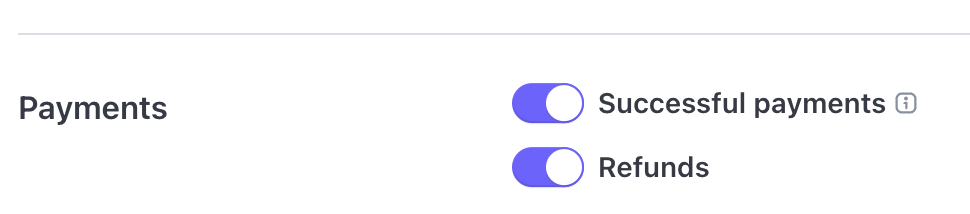
When a purchase happens in the Marketplace we are NOT sending you an email notification (from Teachery). Instead, you’ll want to turn ON email notifications for “Successful Payments” in your Stripe account.
To turn on receipt emails:
Turn ON Successful Payments ✅ - These are email notifications YOU will receive every time you make a sale through the Marketplace. They can be found in your Stripe account under 🔗 Settings > Communication Preferences > Payments area (scroll down on that page to toggle ON Successful Payments).

Teachery will NOT be sending any automatic payment receipt emails for Theme purchases, only the Welcome Email within the Theme (and since the purchase is made through a Stripe Checkout page, no payment info comes through the Welcome Email).
For that reason, you’ll want to turn on…
Turn ON Payment Receipts ✅ (for your customer) - These are email notifications your CUSTOMER will receive that have the payment receipt info. They can be found in your Stripe account 🔗 Settings > Business > Customer Details > Payments area (toggle ON Successful Payments).
By default, any paid Themes sold in the Marketplace will use Stripe Checkout Pages and the following payment methods:
Google Pay (shown at most times)
Apple Pay (shown when a customer is on an Apple device or Safari browser)
Link (shown at most times)
Klarna (shown at most times)
❌ PayPal is not being offered as a payment method in Teachery at all at this time. They are an archaic payment processor and as much as we’d love to offer them, we cannot justify the development headache and nightmare it is to work with them 😅.
Taxes are extremely tricky and difficult 🙈. For U.S. based business owners, you do not need to charge tax at this time.
If you are outside the U.S. and your country requires you charge tax for your Themes, you’ll need to turn ON Stripe Tax in your Stripe account, let us know you want to charge tax, and the Stripe Checkout page will calculate and collect the necessary tax for a Theme purchase.
Please note: Tax calculation is going to be done automatically by Stripe during the checkout, all we can do is guide you turn it on in your Stripe account. You need to handle all the country registrations necessary if you want to charge tax to certain countries.
That’s it! If you have any other questions that we did not answer here or in the following related help docs, contact us using the support chat.
