This feature was created to help support course creators who want to manually add customers to a course (without that user having to do anything at all!)
If you have many customers to import in bulk, please see this help doc.
Make sure you're in the Teach section in the top nav bar
Click Customers in the sub-nav menu
Click + Add Customer to Course, Product, or Theme button
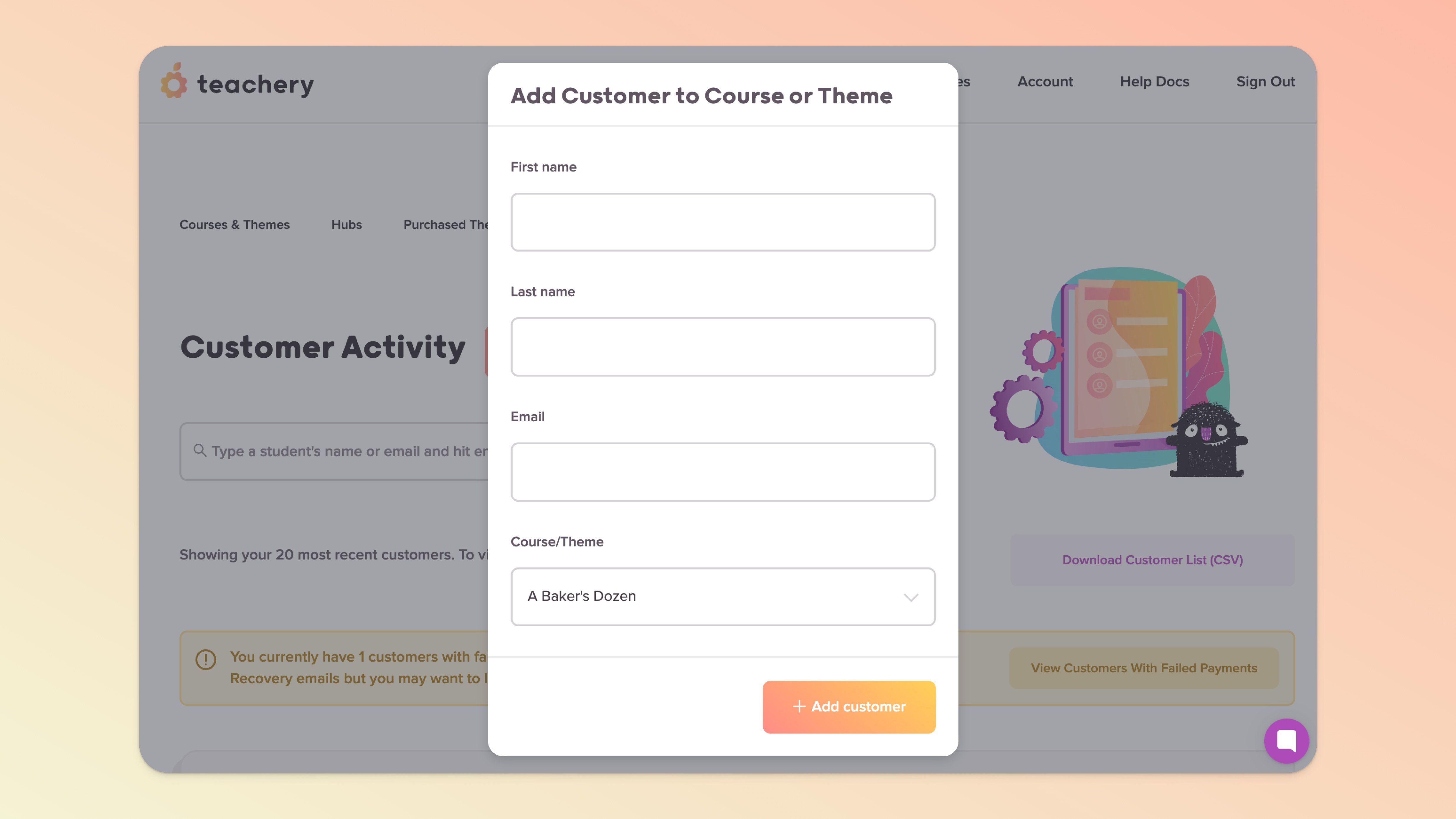
Enter the customer's First name, Last name, Email, and then select the Course or Theme from the dropdown menu
Click the + Add customer button and they'll be added*! ✅

Or just want to test out how your course flow looks?
You can also use the + Add Customer to Course, Product, or Theme option to quickly add test customers or yourself. It’s a simple way to give someone access to your course without having to create a Landing or Payment Page.
That said, if it’s the full checkout experience you want to test, we strongly recommend making a real test purchase.

💬 If, at this point, you hit any hurdles/doubts and can’t find the answers elsewhere in our help center, please use the support chat bubble* in the bottom right of your screen. Make sure to include course/product info, customer info, helpful screenshots, or anything else that may be relevant to your query.
* Support hours are 09:00 to 17:00 GMT.
