While we'd love to give you the power to bulk add students into your course via a CSV file, there are a lot of things that can go wrong. 😅
Instead, we'll handle any bulk import for you and just need you to contact us (through the support chat bubble in the bottom right) with THREE things:

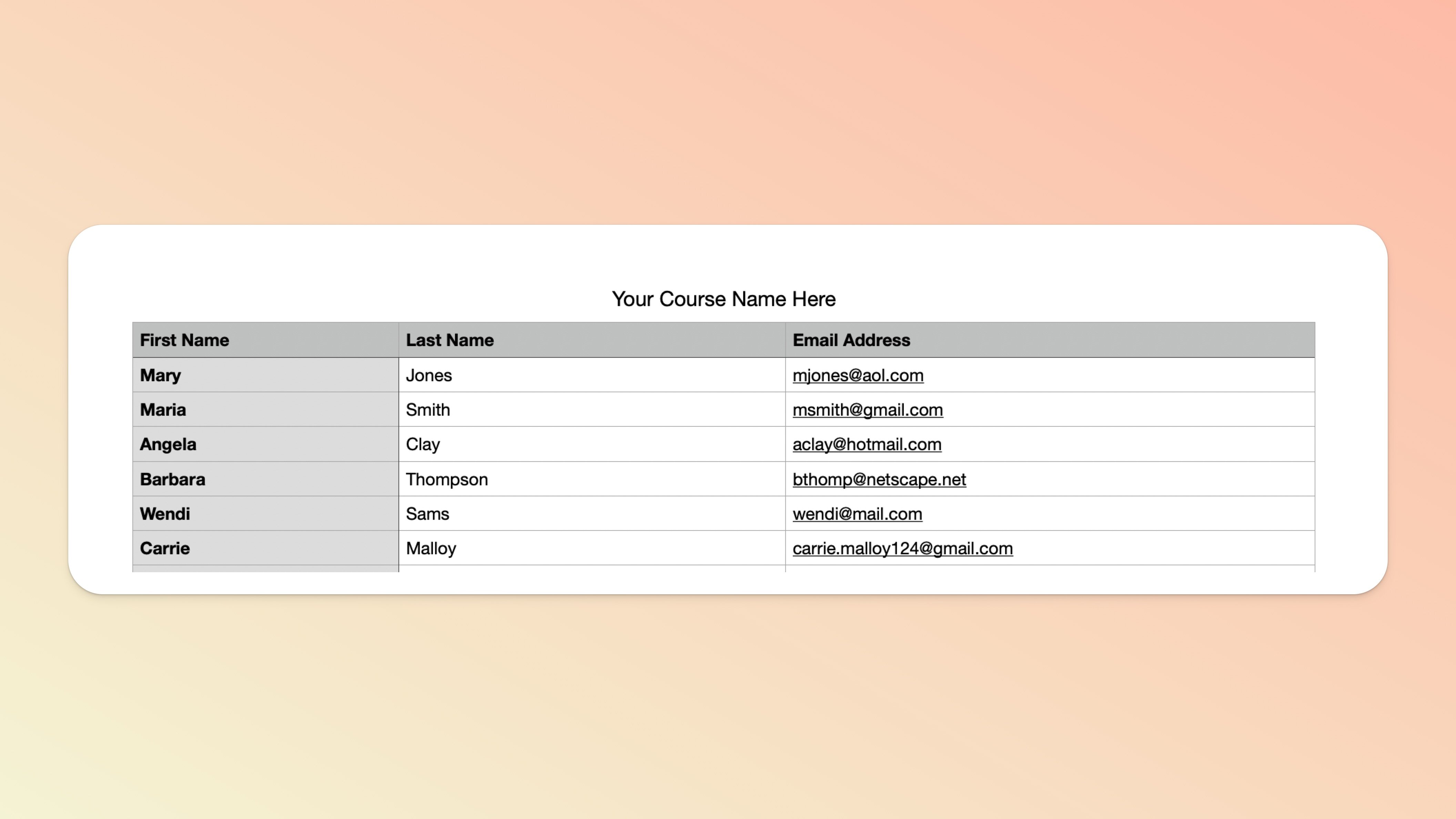
Your CSV file should only have 3 columns of data in it:
First Name
Last Name
Email Address
🌟 Please also name your CSV with the Teachery URL of your course.
You can find your Course Name in the Course Settings > Manage Options page while editing your course. An example filename would be: your-awesome-course.csv (if your course URL was your-awesome-course.teachery.co)
Here's what your CSV should look like:
Please be very clear in explaining which course(s) you want your students added to. The Course Name is all we need for this.

We HIGHLY recommend saying yes ✅ to this as this email includes course/product information (and anything else you’d like to cover - it’s customizable) and, more importantly, it includes a “smart” login and/or download link (depending on the course/product) which ensures a smoother onboarding and gets them right into the content.
If you choose not to send them, please be prepared to communicate important links to users in another way or handle any account access queries that you might receive from users (your Course Links page might prove handy here). 😉
If you do choose to send welcome emails, please ensure your emails are fully set up and enabled before reaching out to us. If some of your users do not receive their emails, you can resend individual emails and/or troubleshoot.
If customers hit access issues, you can suggest a couple of things: resetting their password and/or fully clearing their browser cookies/cache and then attempting to visit the direct course login page. (For both cases, please make use of the Course Links page mentioned above.)
Once you’ve submitted everything we need via our support chat 💬, we should be able to complete the import within 48 hours (Monday - Friday).
Note that this can also depend on the number of users and courses that are impacted. If you’re intending to migrate thousands of users at one time, please consider an alternative method of moving your users over or please otherwise reach out to us so that we can help you gauge how long a migration like this could take (it may need to be staggered to minimise the chance of your first welcome emails being flagged as spam).
💬 If, at this point, you hit any hurdles/doubts and can’t find the answers elsewhere in our help center, please use the support chat bubble* in the bottom right of your screen. Make sure to include course/product info, customer info, helpful screenshots, or anything else that may be relevant to your query.
* Support hours are weekdays from 09:00 to 17:00 GMT.
