We understand that you may not want your course/product to live on your-awesome-course.teachery.co as a domain name. This is why we offer the ability to house your course (or product or hub) on whatever custom domain you like.
Every course/product/hub you create in Teachery can have its own custom domain. If you create and sell 10 courses? All 10 of them can have their own custom domains.

If you intend to have or already have a lot of courses/products/hubs, give some thought as early on as possible to how you want to structure your domains or subdomains.
Login to your domain registrar
Find the DNS settings area for your domain
Add a new DNS record
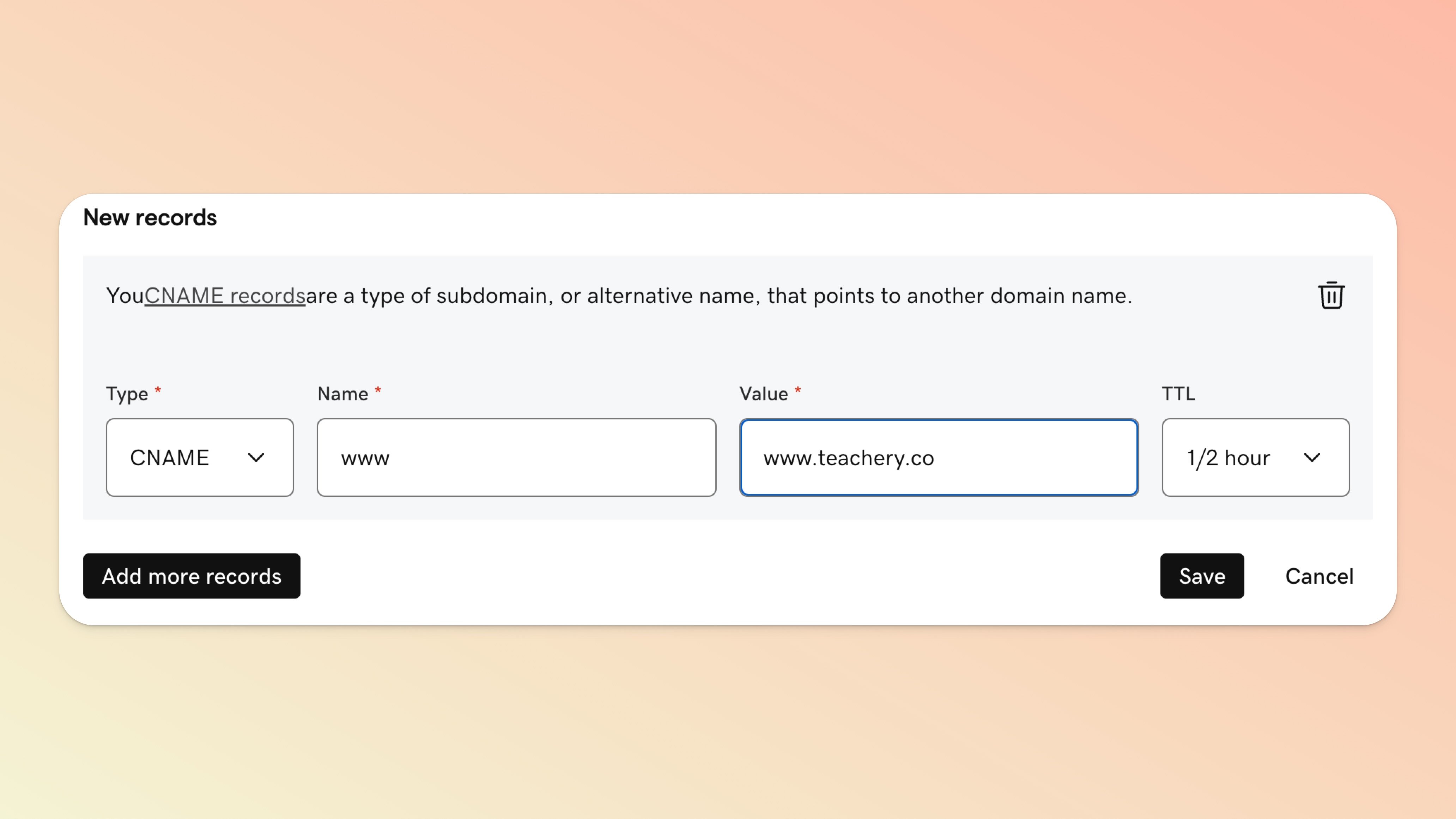
Add www as the Name/Host
Change the record type to CNAME
Set the TTL to ½ hour/automatic
Set the data/value to www.teachery.co
Recommended: Add domain forward of non-www domain (yourcustomdomain.com) to www.yourcustomdomain.com
Here's an example CNAME record added in GoDaddy:
Click into the course/product/hub you want to set a custom domain for
Scroll down to the Course/Product/Hub Settings section of the left sidebar
Click "Manage Options"
Scroll to "Custom Domain" and input www.yourcustomdomain.com*
🚨🚨 IMPORTANT: Please triple-check your domain is written correctly before saving
Then click the Save Options button to save
Wait for domain propagation (which can take 24-48 hours)

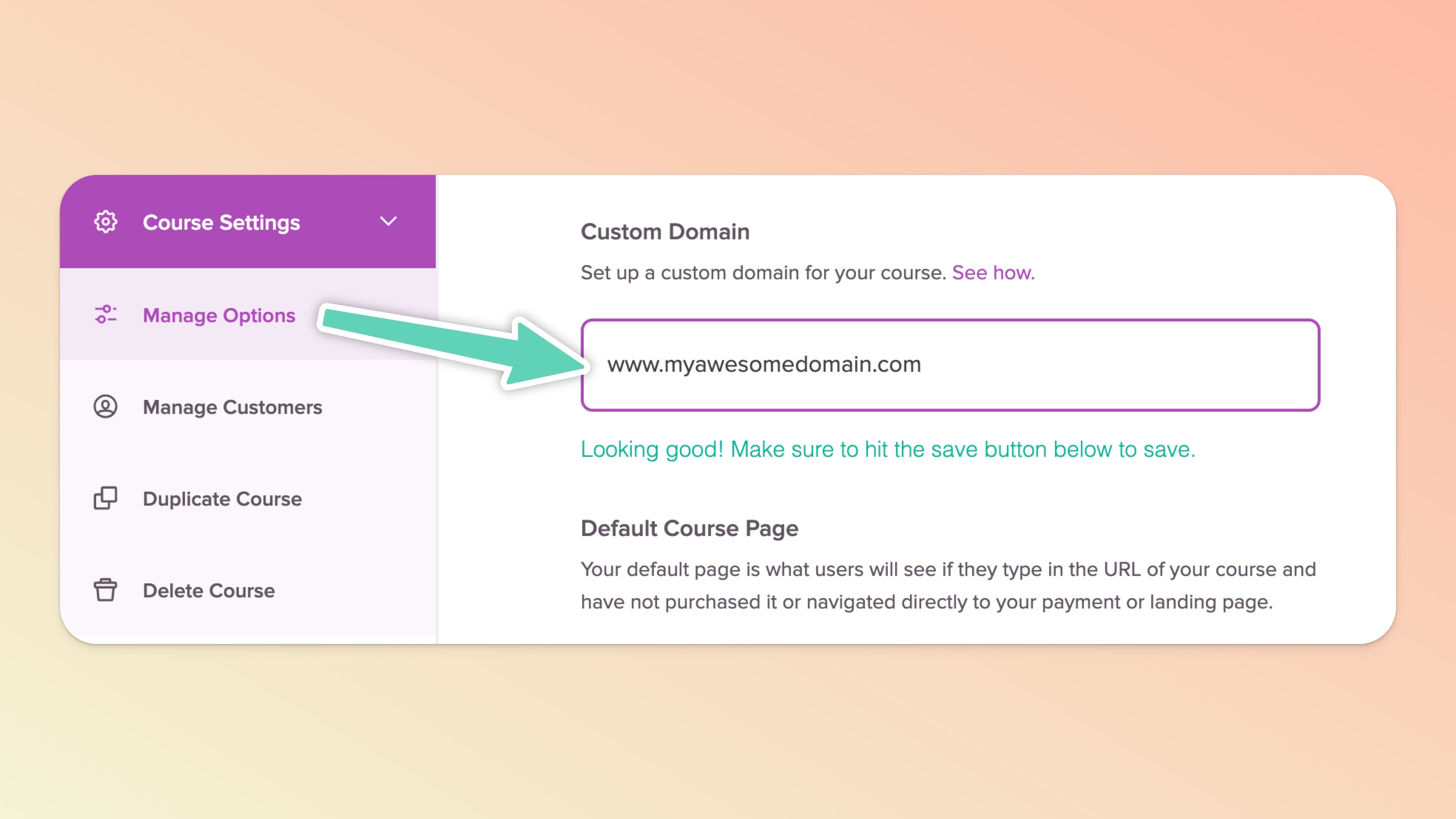
You can also set your Default Course Page in the Manage Options area of Teachery. If someone types www.yourcustomdomain.com, this is the page in Teachery they will see if they are NOT logged-in.
We recommend leaving the Default Course Page set to your Login Page, but you may want to switch it to a Landing Page or Payment Page in some scenarios.
Every domain registrar is different, and if you can't access your DNS settings, contact support at your domain registrar.
Every course in Teachery can have its own unique domain (just repeat the steps above and pick a different domain or subdomain for each).
Most domain registrars have their own help docs about DNS setup if you need help with your specific registrar.
Custom domains should be written in lowercase (awesome.domain.com, not Awesome.Domain.com)
Domain propagation simply means how long it takes for your new domain to point correctly to Teachery. It can take 24-48 hours for propagation to finish, so plan accordingly. You can check if your domain has finished propagating by using a site like DNSchecker.org.
If you don't want your entire domain (ex: giraffesrock.com) to point to your course/product/hub on Teachery but you DO want, for example, courses.giraffesrock.com to be your custom subdomain for your course, you'll want to read this help doc.
Making sure your course domain is secure matters to us, which is why we handle the automatic encryption (SSL) of your custom domain when added to Teachery 🥳.
This service is done at NO extra cost to you, we handle creating an SSL certificate for your custom domain once it's fully propagated to Teachery*. Yep, we've got your back!
If you aren't familiar with SSL, this just simply means we will force the domain to be https:// instead of http:// (that "s" is the fancy secure part!)
You can sleep easier at night knowing once your custom domain is fully connected to Teachery, your customers will have secure checkouts, logins, and an encrypted and safe browsing experience through every page of your course!
*Reminder: Domain propagation can take 24-48 hours.